

Leveraging social media to grow your business.
As part of the Acceleration series, Setting Your Social Strategy shows you how to maximize your social presence as a way to deepen existing client relationships and identify and connect with new prospects.

Let’s get started

To keep pace with new communication preferences and leverage the efficiencies and exposure that these platforms can provide, advisors everywhere are adding social media to their business development strategies as a means to build awareness, drive engagement and grow their business.
If you are new to social media, there’s no better time than now to get started. If you are already on social media and looking for ways to expand this channel as a focused part of your business development plan, you’ll be joining the over 89% of advisors who report business growth through social media.
Your wholesaler is here to partner with you and provide any level of support you may need.
Do you have a social strategy?
Program overview
Next: Planning guide
Around 7 out of 10 Americans, or 72%, currently use social media to connect and interact with one another, to discover and engage with news, to share information, to learn and to be entertained.
If you are new to social media, or revisiting your existing approach, here are some essential considerations for review. Your wholesaler can help you work your way through these steps.
Laying a foundation
for success.
Planning guide
Follow these five steps to help create or improve your social media strategy.
Creating your
plan of action.
Checklist & timeline
Next: Tools & guides
Setting up and optimizing your LinkedIn profile is easy. Think of LinkedIn as a virtual introduction to a community of professionals. New clients, prospects and referral sources use the information you post to form opinions about you, sometimes before they meet you in person. Sharing your LinkedIn profile with your company’s compliance department is an important step when getting started, to make sure you’re following standards. Plan to revisit your profile at least annually, and update as you add credentials and experience.
Getting started
on LinkedIn.
Tools & guides
Next: Tools & guides
Program overview
Planning guide
Checklist & timeline
Review & follow-up
Next steps
Review & follow-up
Have any questions?
Next steps
Contact Your Wholesaler
877.345.GROW (4769) | cmannuities.com
CUNA Mutual Group is the marketing name for CUNA Mutual Holding Company, a mutual insurance holding company, its subsidiaries and affiliates. Annuities are issued by CMFG Life Insurance Company (CMFG Life) and MEMBERS Life Insurance Company (MEMBERS Life) and distributed by their affiliate, CUNA Brokerage Services, Inc., member FINRA/SIPC, a registered broker/dealer and investment advisor, 2000 Heritage Way, Waverly, IA 50677. CMFG Life and MEMBERS Life are stock insurance companies. MEMBERS® is a registered trademark of CMFG Life. Investment and insurance products are not federally insured, may involve investment risk, may lose value and are not obligations of or guaranteed by any depository or lending institution. All contracts and forms may vary by state and may not be available in all states or through all broker/dealers.
FOR REGISTERED REPRESENTATIVE USE ONLY. NOT FOR USE WITH THE PUBLIC.
CMGA-2556821.2-0421-0523 ©CUNA Mutual Group
Back to top

Tools & guides
Program overview
Planning guide
Checklist & timeline
Tools & guides
Review & follow-up
Next steps
Program overview
Planning guide
Checklist & timeline
Tools & guides
Review & follow-up
Next steps

Program overview
Planning guide
Checklist & timeline
Tools & guides
Review & follow-up
Next steps
Program overview
Planning guide
Checklist & timeline
Tools & guides
Review & follow-up
Next steps
Program overview
Planning guide
Checklist & timeline
Tools & guides
Review & follow-up
Next steps

Getting started
Generating referrals
Leveraging your mutual connections is just one way to find new prospects. LinkedIn offers useful search functions in both its free and subscription versions.
Making the most
of social search.
Tools & guides

Next: Tools & guides

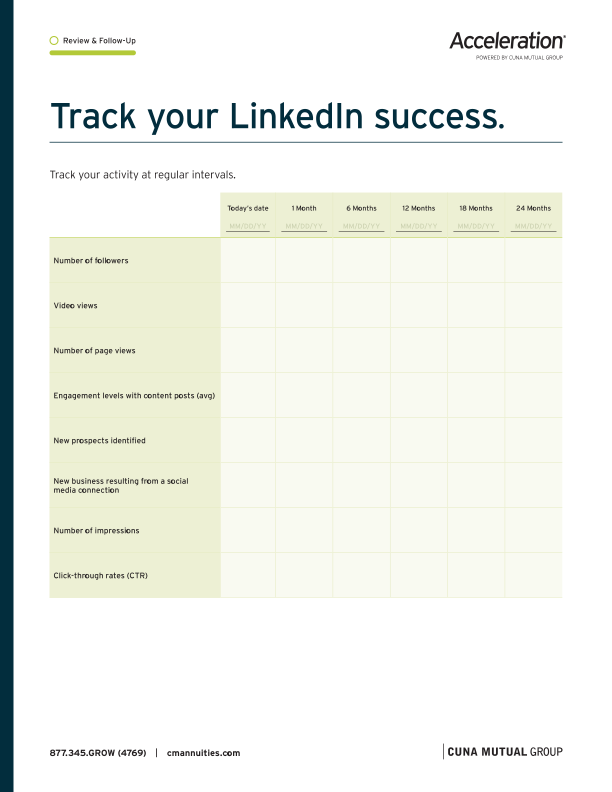
To help you build your social media strategy, we’ve provided a sample worksheet to help you track a few key metrics.
Track your
LinkedIn success.



1. Add a photo
2. Set the stage
3. Conact info
4. Introduction
Add a professional photo.
Corporate headshots are fine, but don’t be afraid to let your personality come through. You’re making a first impression, so choose the right expression and attire.
• Wear what you’d typically wear in the office.
• Consider something a bit more modern that includes an interesting
background that isn’t distracting.
• Be creative and approachable.
Your background photo is also an important consideration. Select a unique image that represents your business and brand.
Getting started
Here are some simple steps to get started.
Basic Search
Advanced Search
Hashtag (#) Search
The free version of LinkedIn has search capabilities with added filters for people searches.
To open the All Filters page, click on the Search Box next to the LinkedIn logo at the top and then click the magnifying glass to the right of the search bar. A new navigation bar will appear that says All Filters. Click to enter the selection page.
The All People Filters page allows you to search for individuals based on their location, current and past employers, industry, schools attended and more. By entering a contact name in the Connections of box, you can quickly scan secondary connections of your primary contacts and find your best prospects.

Advanced search capabilities are available through upgraded LinkedIn subscriptions to Sales Navigator. The search options through this program offer deeper search capabilities, including keyword, zip code, years of experience and more.
These broader search categories allow you to fine tune your search efforts for more targeted prospect selection.
Hashtags are words or phrases preceded by a hash sign “#” that help identify topics of messages or content on social media platforms. Many users search for information on topics by using hashtags, so this is a great way to elevate and amplify your social media posts, and make them more visible to the right people.
A carefully selected hashtag can help your LinkedIn posts be seen by audiences who are specifically interested in your topic. Consider hashtags like #retirement, #financialplanning, #investment, or others that are appropriate for your content and relevant to your audiences. Keep hashtags simple and remember, three to four is a smart limit per post. And remember, always proofread hashtags for spelling.
Download Sample Activity Tracker
NOTE: The tactics and strategies presented here are not meant to supersede existing firm guidelines or regulatory and compliance standards in place for licensed individuals. Before taking action, we recommend you share your approach with your broker/dealer for approval.
1. Pew Research Center, Social Media Fact Sheet, April 7, 2021.
2. Putnam Investments, Grow your business using social media:
Strategies and expertise to build and strengthen relationships, 2020.
1
2
SOURCE:
1. Putnam Investments, Grow your business using social media: Strategies
and expertise to build and strengthen relationships, 2020.
2. LinkedIn Pressroom, About Us, 2021.
3. LinkedIn Marketing Solutions, Insights and Research. Accessed May 3, 2021.
Platforms to consider in
your strategy.
Planning guide
Next: Checklist and timeline
Next: Planning guide

LinkedIn

Facebook
Twitter
YouTube
Instagram


5/5
Instagram
About the platform
Though it’s owned by Facebook, Instagram is a platform, primarily accessed by mobile app, with
a younger overall audience. Among those ages
18-29, 71% report using Instagram, while among older Americans (ages 65+), only 13% are users.
Value to your business
Instagram can help you build your brand and it’s great to use if you’re hosting an event or attending one. Advisors often take photos of themselves with colleagues or peers at an event and include the event hashtag associated with it to gain additional visibility and credibility as a thought leader.
2
4/5
YouTube
About the platform
YouTube now holds the top spot for social media use in the U.S., with 81% of adults reporting they use the site. Americans over age 65 represent the lowest rate of use of the site, at just 49%, but use of YouTube by those earning $75,000+ is 90%, and among those with college degrees, 89% use the video platform.
2
Value to your business
YouTube is a highly effective medium for financial advisors that can help you easily publish video content to reach a large audience.
1/5
LinkedIn
About the platform
LinkedIn is the preferred social media platform for business professionals worldwide, with 756 million members globally and more than 196 million in North America. Half of adults with an income of $75,000+ report using LinkedIn, and 51% of U.S. college graduates say they use the site.
2
Value to your business
LinkedIn can help you brand your business, expand your professional network, connect with current clients, increase referrals and introductions to potential clients, communicate with new client leads and prospect for new business relationships.
3/5
Twitter
About the platform
Twitter users skew younger and urban or suburban (50%) over rural (18%), with users ages 18–29 the largest group reporting they use the site, at 42%, and slightly more men than women reporting that they use the platform. Less than half (46%) of Twitter users report checking the site or app about once a day or more often. Among adults earning $75,000+, 34% are Twitter users.
2
Value to your business
Twitter can help you get the word out when you are hosting a webinar, speaking at an event or attending an industry conference — and lets you share those moments immediately with the world. Advisors often share commentary on current news or encourage their audiences to engage in an event. Twitter is one of the fastest-growing networks for business, and it is often used as a prospecting tool.
2/5
Facebook
About the platform
69% of U.S. adults say they’re active on Facebook, and among people with an income of $75,000+, 70% use the platform. Majorities of adults in urban, suburban and rural U.S. areas are Facebook users, and among the college-educated, 73% are users. Among Facebook users, 70% say they visit the site at least once a day.
2
Value to your business
Facebook can help you build your brand identity, cultivate relationships with specific prospective clients once they are identified and enhance client relationships.
1
Check with your compliance department regarding which social media platforms are acceptable for use.
SOURCE:
1. LinkedIn, About Us: Statistics, 2021.
2. Pew Research, Social Media Use in 2021, April 7, 2021. Survey of U.S. adults
conducted Jan. 25-Feb. 8, 2021.
5
How will you measure the success of your program? What metrics will you consider? Will you base it on followers, size of your extended network, content viewed and shared, number of prospects generated through social and client retention?
Measuring success
4
What is your call to action? Will you drive traffic to your website? How will you connect with new followers and leverage follower connections? Also, how will you respond to comments? Plan a consistent response strategy for all types of comments you might encounter.
Response and follow-up
Define some parameters that can help guide how you intend to support your social media strategy.
• How frequently do you intend to post
new information?
• How much time each day will you spend on
monitoring your social activity?
• How will you manage errors and what are your
firm’s guidelines for correction?
Managing your program
3
Communicate your strategy with your firm’s compliance department to ensure you are aligned with the standards and requirements they have in place. Requirements may include access to your page for regular reviews and archiving of content posted.
Sharing your strategy
2
Why. Think about your objectives, whether they involve staying connected with existing clients, gaining new referrals, building brand awareness, establishing your expertise, building a stronger centers of influence network or all
of the above.
Who. Define your target audience. Is it individuals, business professionals or businesses? Do you want to narrow that definition down to focus on gender, age, location or perhaps profession?
What. Based on your audience and objectives, what types of content will you be posting
or sharing?
• Do you have content created by a
marketing department that can be
repurposed or will you be authoring
your own commentary?
• Will you be researching content from other
sources or news media for your posts?
• What are your firm’s review processes for
content distribution?
Where. Which social media platform(s) makes the most sense for your business? LinkedIn is the most popular social platform used by advisors, with 85% reporting that they use it. Facebook follows, with 65% of advisors saying they use it to support their business. With
756 million members globally viewing 280 billion feed updates annually, LinkedIn draws people who are specifically interested in professional insights.
When. Setting calendar reminders to regularly post on LinkedIn and engage with other users in your network can help ensure that your content is up to date and relevant. It’s essential to remember that engagement works in
both directions.
2, 3
1
Your social media strategy
1
5
Create a scorecard to track activity at regular intervals:
• Number of followers
• Video views
• Number of page views
• Engagement levels with content posts
• New prospects identified
• New business resulting from a social media connection
• Number of impressions
• Click-through rates (CTR)
Success
4
Response and follow-up
• Create or review your LinkedIn Profile page for
optimal impact.
(See Track Your LinkedIn Success document.)
• Dedicate time on your calendar to update and
monitor your social media program. We
recommend starting with a 30-minute-a-day
commitment that you can adjust over time as
your program goes live and expands.
Implementation
3
• Schedule time to share your social
strategy with your firm’s compliance
group for review, guidance and approval.
(See Getting Started resource guide.)
• Ensure you understand the process for
approving shared content and posts.
Compliance
2
• Clearly define and complete your Social Media Strategy.
• Share your strategy with team members and support staff.
Strategy
1
Post new content.
Check and respond to:
• New notifications that allow you to monitor
the activity of existing contacts, such as job
changes or promotions, and send
personal responses
• New messages from followers or requests to
connect from new contacts
• Profile views activity and determine if a
follow-up communication is appropriate
Get connected with new people. Set a goal
and review:
• The connections of your existing contacts
• Individuals who have viewed your page
• The contacts recommendations from LinkedIn
Join new groups.
• Identify groups that align with your business.
• Join groups that are frequently visited by
your clients.
• Review the list of group recommendations
from LinkedIn
5. Experience
6. Skills/Referrals
7. Interests
8. Privacy
9. Engage
10. Services
11. Review
*Sales Navigator professional is also available at Team and Enterprise levels, with added InMail access and more advanced features.
SOURCES:
1. LinkedIn, LinkedIn Free Accounts and Premium Subscriptions, December 17, 2019.
2. LinkedIn, Compare Sales Navigator to Other LinkedIn Products, 2021.
3. LinkedIn, Who’s Viewed Your Profile - Basic and Premium Features, 2021.
4. LinkedIn, InMail Messages, 2021.
1. Add a photo
Set the stage.
Beneath your name, don’t feel restricted to listing your current job title. Tell your audience what you do. Some examples might be:
2. Set the stage
Aaron Alexander
Financial Advisor
• Helping people plan for retirement for over 15 years
• Turning financial complexity into personalized outcomes
• Providing investment and estate planning strategies
• Helping clients navigate their financial futures
• Putting retirement solutions within reach
Contact information.
Review your contact info. Make sure your phone number and address are listed. This is also the time to review your profile URL and see if the random URL assigned to you by LinkedIn is acceptable. You can edit it to include your full name or another URL of your choosing.
Website links to your firm website or blogs can be added here as well.
Introduce yourself.
The About section is your place to shine and let your personality come through. Consider this section your elevator speech — a 30-60 second commercial for who you are and what you do.
Think about how you present yourself when you’re having a new client conversation or engaging with a prospect. How do you introduce yourself and what do you say that lets them know they are in capable hands? How do you differentiate your services? Write like you speak.
Experience.
Remember your audience and customize your work history, emphasizing areas they will want to know about you and your experience. This is also a great place to showcase your volunteer work.
Skills, endorsements and recommendations.
Don’t be shy about asking for referrals from clients, work associates and acquaintances. Third-party endorsements of this kind can go a long way to validating a prospective client’s desire to reach out and connect.
Interests.
Review which groups and companies you are following on a regular basis. New clients and prospects, as well as referral sources, will begin to form a perception of you based on association. What do your choices tell them?
Privacy settings.
Review the How others see your profile and network information and How others see your LinkedIn activity sections of your profile pages. Make sure you are allowing the right level of access to your profile that is allowable by your compliance department.
Engage with your network using your LinkedIn profile.
It’s not enough to establish your profile. Be sure to find a range of relevant articles, blog posts, and other content for your prospects and clients. LinkedIn stories can be posted from your mobile app and are shared for only 24 hours. Sharing stories is a way to connect on a more personal level with your community. Remember to tag content with appropriate hashtags (#) to make your posts easy to find in searches.
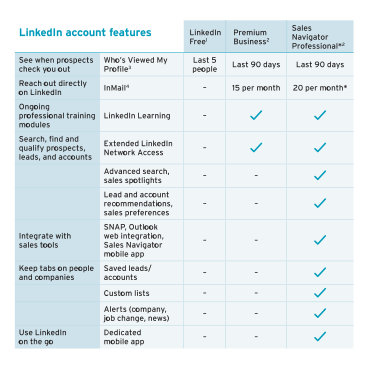
Upgraded services.
Basic LinkedIn services are free for users, but optional upgrades at different pricing levels can offer useful, advanced capabilities. Premium and professional plans are billed monthly or annually, so you can try them out for a few months and choose the account type that best supports your business.
Here’s a quick comparison of
account features.
Review.
Plan to review your profile page on a regular basis to refresh and keep your content current.
3. Conact info
4. Introduction
5. Experience
6. Skills/Referrals
7. Interests
8. Privacy
9. Engage
10. Services
11. Review
If you are an advisor firm and you consider yourself a solo entrepreneur or small business owner, LinkedIn’s free Open for Business feature may be a good fit for you. This feature allows small business owners to network and connect with LinkedIn members looking for the services they offer. It also allows service providers to reach potential clients.

Next: Review & follow-up
My network
Building out your contacts and mining potential leads starts with your core network of clients, business associates and friends.
Generating referrals through LinkedIn.
Tools & guides
Hashtag (#) Search
Advanced Search
Basic Search

• Make a list and start the connection process online.
• Personalize your connection messages and avoid a
sales message. Be genuine.
• When they accept, send a thank you note.
Connect on LinkedIn with people you meet offline
If you’re at a conference or another social event and get people’s business cards or contacts, turn those people into LinkedIn connections, too. Likewise, if you’re presenting at a seminar or event, encourage people to connect with you. Always be on the lookout for new connections.

Check your weekly dashboard to see who is visiting your profile. If you have an upgraded Premium account you have access to InMail, which allows you to write directly to individuals you are not connected with.
Who’s viewed your profile
1
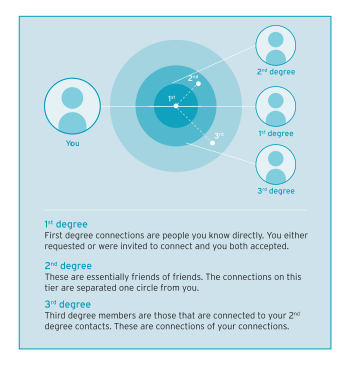
Visit a contacts profile page and select the See Connections link to scan their connections. Identify a handful of contacts that you would like to connect with. Reach out to your contact through email or set up time to discuss your goals with your contact in person or over the phone.
You may find that while some contacts are more than happy to make an introduction, others may be less willing to take the step. And that’s okay. It may take them a while to consider the idea of a personal referral or maybe they don’t know the contact well enough to make the introduction.
For contacts willing to initiate an introduction, there are many ways to start a relationship. Contacts can connect you through email or even suggest a warm introduction over coffee.
Mining referrals
SOURCE:
1. LinkedIn, InMail Messages, 2021.
Staying active on LinkedIn
You can add value to your followers — both your prospective clients or existing clients — by sharing thought leadership and insightful content for your clients. Quality content can become a great conversation starter with your clients.
In addition to being active on LinkedIn, it's important to follow and understand LinkedIn algorithms so you constantly stay on top of the LinkedIn Feed. Things that help increase visibility and engagement include using hashtags, tagging people or companies, posting video content, replying to comments and resharing posts.
Exporting connections
from LinkedIn
At some point you may want to export a list of the connections you have made on LinkedIn. To export a list of your LinkedIn connections:
1. Click the Me icon at the top of your LinkedIn homepage.
2. Select Settings & Privacy from the dropdown.
3. Click the Privacy tab at the top of the page.
4. Under the How LinkedIn uses your data section,
click Change next to Download your data.
5. You’ll be redirected to the Download your data page
where you can select Connections.
6. You will receive an email to your primary email address
that will include a link where you can download your list
of connections.

NOTE:
You can only export a list of your 1st level contacts and not 2nd or 3rd level associations.
Remember that your connections are also looking to build their networks, so make sure that when you’re asking for a referral you are returning the favor by giving referrals to others. The act of recommending another business to a friend or colleague can start a chain reaction that can lead to lots of new business.
Check with your compliance department and follow all broker/dealer policies and procedures regarding social media.
Reciprocate

LinkedIn offers a Social Selling Index, which serves as a kind of report card on the success of your social efforts. Your score is based on the four elements of social selling:
• Establish your professional brand
• Find the right people
• Engage with Insights
• Build Relationships
SOURCE:
1. LinkedIn, Social Selling Dashboard, 2021.
1
Your score is determined based on the 4 elements above. Get your baseline Social Selling Index (SSI) score through LinkedIn’s free site, and work through the steps in this guide to ensure your score is at or above the average SSI of 25 (for sales professionals in the financial services industry).
SOURCE:
1. LinkedIn, Social Selling Dashboard, 2021.
Platforms to consider
Laying a foundation
Program overview
Planning guide
Checklist & timeline
Platforms to consider
Laying a foundation
Tools & guides
Review & follow-up
Next steps
Social search
Program overview
Planning guide
Checklist & timeline
Tools & guides
Getting started
Generating referrals
Review & follow-up
Next steps
Social search
Program overview
Planning guide
Checklist & timeline
Tools & guides
Getting started
Generating referrals
Review & follow-up
Next steps
Social search
LinkedIn
Features
®
®
1
2,3
2