
Launching Your Recognition Program with Workhuman
We are thrilled to partner with you in bringing your Social Recognition® program to life. This document provides a detailed overview of the steps, resources, and best practices to ensure a successful implementation and launch of your program. Our goal is to help you create a culture of recognition that drives engagement, productivity, retention, and real business results within your organization. This begins now!
As the #1 in employee recognition software, with a track record of proven results, we at Workhuman® know what it takes to launch a successful program for all kinds of organizations. At the heart of our formula for success – and what differentiates us from our competitors – is the close and strategic partnership we have with clients. Our launch and implementation teams lay the groundwork for a fruitful program and partnership.
To help move your organization along your exciting journey, should you decide to partner with us, our launch team would like to provide you with some “early planning guidance.” This document is intended to bridge the gap between where you are now and the early stages of launch by sharing advanced information on timing, key tasks, milestones, and workstreams for consideration. We encourage you to share it with your technical teams and other relevant stakeholders so they may be brought in early. In addition, keep in mind that the information shared below is a ballpark blueprint and specifics can vary based on your organization's wants and needs.
Welcome to Workhuman

(well, almost)!
Planning: Month 1
Strategy: Month 1-2
Design: Month 2-3
Launch: Month 3+
y
Week
>-------------->-------------->-------------->-------------->-------------->-------------->-------------->-------------->-------------->-------------->-------------->
1--------------2--------------3--------------4--------------5--------------6--------------7--------------8--------------9--------------10-------------11-------------12+
Project plan stages
Discover
Design
Develop
Deliver
Test
Launch
Technical Workstream
Discover
Introduction and define success criteria.
Week 1: Attend introduction call, design lab/kickoff call, and data exchange call.
Week 2: Confirm program languages, finalize platform name and tagline.
Design
Review technical employee details to begin building the platform.
Week 3-5: Attend branding call, review invoice process, confirm employee details fields, confirm award details (payroll) fields, and discuss SSO pre-requisites.
Week 6: Review initial SOLI table, and design platform homepage.
Develop
Platform configuration and integration of SSO, HRIS, and payroll details.
Week 6-9: Approve final homepage design mockup, configure sandbox employee details, deliver sandbox employee data, move employee details to production.
Deliver
Finalize award and spend detail configuration.
Week 4-10: Complete SSO configuration, complete invoice configuration, finalize award reasons and descriptions, configure spend management in sandbox.
Test
Complete QA and UAT.
Week 7-12: Confirm SSO access, validate award details (payroll) integration processing, host UAT kickoff call, signoff on successful completion of user acceptance testing.
Launch
Finalize production details and complete launch review.
Week 10-12: Deliver production data and push to production, configure SSO in production, complete launch review.
Discover
Week 1 - Attend introduction call.
Meet to discuss introductions, project team, project overview, and next steps.
Week 1 - Attend design lab/kickoff call.
Meet to discuss program design, brand, strategy, and project management.
Week 2 - Attend data exchange call.
Meet to review data requirements and transfer process for Workday integration, ensuring team preparedness.
Week 2 - Confirm program languages.
Provide Workhuman with the list of languages to be enabled for employees.


Design
Week 3 - Attend branding call.
Meet to review branding platform and complete branding questionnaire to provide detailed information about company and design preferences.
Week 3 - Finalize name and tagline.
Provide Workhuman with the approved name and tagline of your platform. E.g. Applause.
Week 3 - Review invoice and file sample.
Review the invoice process and file sample.
Week 4 - Confirm employee details in field.
Verify which employee data fields will be passed to Workhuman, including mandatory fields.
Week 4 - Confirm award details fields.
Confirm fields needed in the award details/payroll data.
Week 4- Discuss SSO prerequisites.
Complete all prerequisites for SSO configuration.
Week 4 - Discuss admin functionality.
Discuss admin functionality, program management, and reporting.
Week 5 - Finalize award reasons and descriptions.
Provide Workhuman with approved award reasons and associated descriptions.
Week 5 - Finalize award levels and amounts.
Provide Workhuman with an approved set of award levels and names.
Week 5 - Determine budget management strategy.
Determine spend management strategy, including tracking and permissions.
Week 5 -Finalize eligibility details.
Finalize eligibility details for each award level, providing approved rules to Workhuman.
Week 5 - Finalize approval details.
Finalize approval details and identify the catchall approver for each award level.
Week 6 - Review initial SOLI table.
Review the initial SOLI table provided by Workhuman for customization and approval.
Week 6 - Design platform homepage.
Design approved platform homepage, before moving on to inner page design.

Develop
Week 6 - Approve final homepage mockup.
Approve the final homepage design mockup, providing feedback if any changes are needed.
Week 6 - Sandbox employee details.
Configure and test the employee details file/integration in the sandbox environment.
Week 7 - Sandbox award details (payroll).
Configure and test the award details (payroll) integration in the sandbox environment, ensuring full testing.
Week 8 - Review/approve configuration document.
Mark the configuration document as "approved" or provide detailed feedback for changes with approval via DocuSign.
Week 9 - Move employee details to production.
After completing sandbox testing for employee details data, move the integrations into the production environment.
Week 9 - Move award details (payroll) to production.
After completing sandbox testing for award details data, move the integrations into the production environment.
Week 9 - Spend management in sandbox.
Complete spend management configuration in sandbox.
Week 11 - Configure invoice setup.
Discuss and confirm the monthly invoicing experience.
Week 12 - SSO in production.
Complete SSO configuration in production.
Deliver
Week 4 - Complete SSO configuration.
Attach completed SSO questionnaire and metadata files.
Week 4 - Complete invoice configuration.
Confirm any changes requested to the default invoice file fields.
Week 6 - Sandbox employee data.
Deliver sandbox test data and run the employee details job, confirming data transmission to Workhuman.
Week 7 - Organize assigned UAT testers.
Identify and schedule assigned user acceptance testers (UAT), including project team members and possibly champions or early adopters.
Week 8 - Finalize and signoff on all decisions.
Formalize project decisions and sign off to allow Workhuman team to complete configuration and testing in sandbox prior to UAT.
Week 8 - Plan user acceptance testing.
Discuss the process for UAT, including client team involvement, issue tracking, troubleshooting, and resolution.
Week 9 - Apply branding to site.
Once platform design is approved, Workhuman team will configure the site branding in sandbox. Design is specific to desktop/browser.
Week 10 - Complete integration enablement.
Enable and configure MS/Slack/Mobile integrations in production. Refer to installation guides for more information.

Test
Week 7 - Confirm SSO access.
Test desktop and mobile access to sandbox SSO.
Week 7 - Award details integration processing.
Validate the award details (payroll) file/integration processing, confirming successful data transmission and testing downstream processes.
Week 10 - Host UAT kickoff call/start UAT.
Host a UAT kickoff call and start UAT. Project team and internal champions should attend and actively participate.
Week 11 - Validate invoice file.
Confirm with Workhuman that the invoice file is sufficient or that any requested changes have been made.
Week 11 - Signoff on successful completion of UAT.
When UAT is confirmed as completed, mark the status "approved". Workhuman LSM can fill out a template for signature if required.
Week 12 - Production SSO access and vanity URL.
Confirm SSO access to production is working in both desktop and mobile apps. Ensure vanity URL redirects properly.

Launch
Week 10 - Deliver production data.
Comment when production data has been transmitted to Workhuman via SFTP or Workday partner portal job.
Week 11 - Push to production.
Workhuman team will perform the initial push from sandbox to production and manually run the first production employee details data for site indexing.
Week 12 - Deploy and review production links.
Both teams will ensure that production is live, testing all access points.
Week 12 - Test production awards.
Perform light testing of production awards with project team accounts, do not redeem awards as redemptions cannot be backed out.
Week 12 - Complete launch review.
Monitor and reflect on the launch by both teams.

Change Management Workstream�
Building a culture of appreciation that delivers results depends on everyone’s active participation. Our launch consulting team works with your change, communications, and training leads to ensure your workforce is ready for launch and inspired to be part of the new program.
Plan and socialize: Strategize a plan that builds awareness and excitement. Engage key stakeholders early during implementation to secure buy-in.
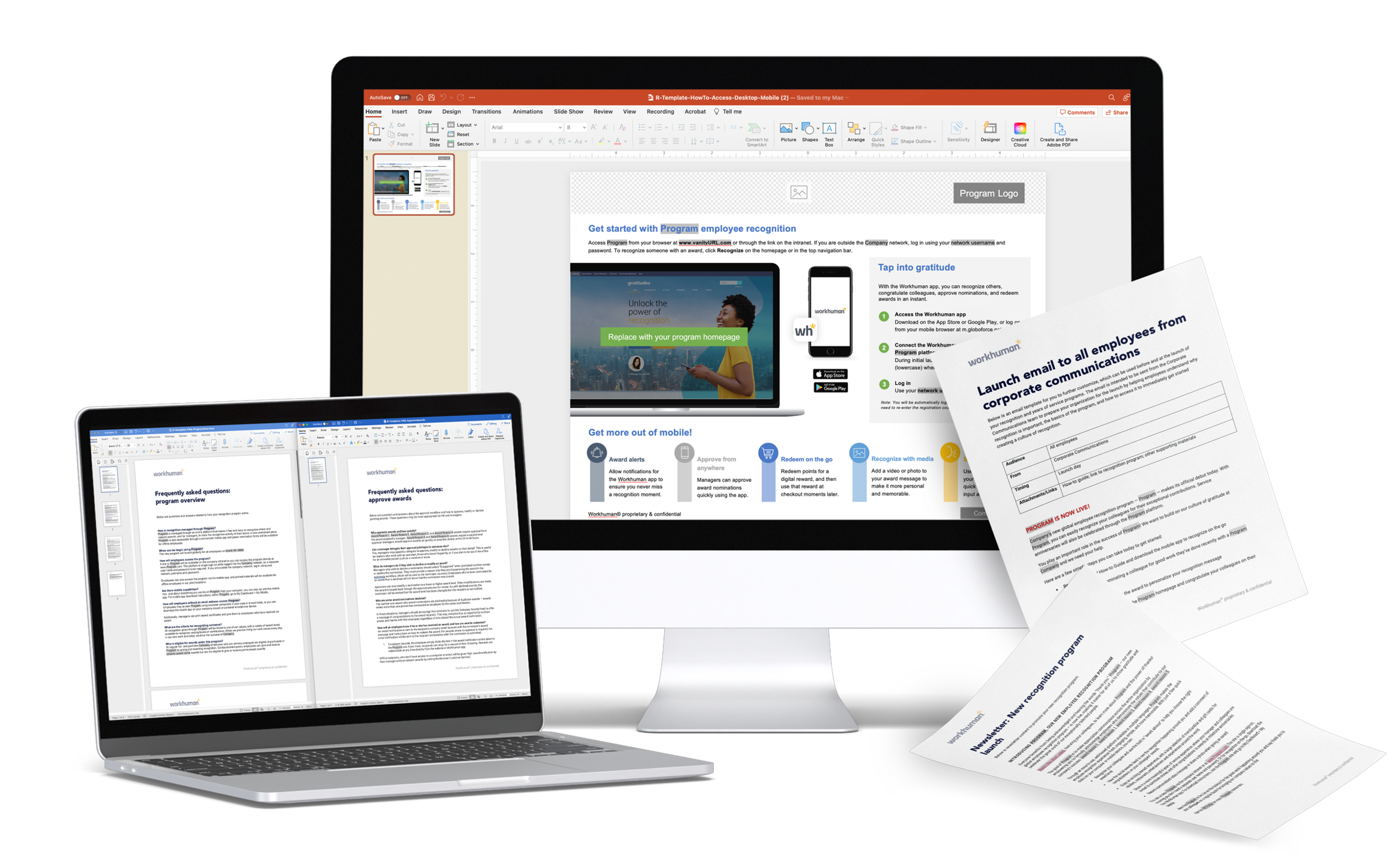
Design and develop: Use Workhuman Connect’s vast resource library for all the materials you need to easily and effectively communicate program details. Workhuman supplements your efforts with a custom-branded visual campaign.
Engage ambassadors: Leverage HRBPs and other influential groups to help champion the change. Host pre-launch training sessions with Workhuman’s support to prepare this important audience.
Create launch day momentum: Host in-person and digital launch events to reach employees in an easy and engaging way. Consider a company-wide launch day award for maximum impact.
Communicating a culture of appreciation
Streamlining change management
Roles, Responsibilities, and Resource Allocation
Design
Discover
Develop
Deliver
Test
Launch
Introduction and define success criteria.
Review technical employee details to begin building the platform.
Platform configuration and integration of SSO, HRIS, and payroll details.
Complete QA and UAT.
Finalize production details and complete launch review.
Finalize award and spend detail configuration.
Ongoing
Growth and comms.
Identify comms lead, create comms and training plan.
Socialize with key stakeholders, develop comms materials.
Engage ambassadors�and deploy manager�comms.
Train managers and deploy employee comms.
Send launch�announcement and host launch day activities.
Transitioning from another platform?
Your launch consultant will partner with you on a plan to sunset legacy programs, draw down or transition reward balances, and showcase the benefits of the new recognition experience.
Identifying your platform pioneers
Successful implementation requires a dedicated project team with clearly defined roles and responsibilities. Here are some key roles to consider as well as each team member's time commitment varies during and after the launch. Scroll over each for more information.
Mapping the road to recognition done right
Next Steps,
Pre-Launch
Planning early:
Considerations before kickoff
The first steps of our partnership together include a strategy session and design lab where we will delve deeply into your unique requirements and requests, then share our own tips and recommendations. However, if you are just as excited as we are, you may feel the urge to take action now. If that is the case, here are some key considerations and early planning actions to help bridge the gap before your initial meetings during the Discover phase with our implementation and launch team.
Define success.
Begin by discussing and defining what success means for your team. Consider the following prompts to guide your thinking:
What are your primary goals and objectives?
How will you measure the success of this initiative?
What key performance indicators (KPIs) will you track?
1
Identify key stakeholders.
Determine who within your organization will be involved in the implementation process. This includes identifying project leads, decision-makers, and any other team members who will play a crucial role. See the prior section for more guidance on roles.
2
Gather requirements.
Start compiling a list of requirements and expectations for the implementation. This might include specific features, integrations with existing systems, and any customization needs.
3
Prepare data.
If applicable, begin organizing and preparing any data that will need to be migrated or integrated into the Workhuman platform. This could include employee information, historical data, and other relevant records.
4
Plan communication.
Think about how you will communicate the launch and implementation process to your organization. This includes the fun part: What will you name your platform? Consider creating an outline of your organization's existing values and key messages, as well as communication timelines and channels.
5
Your launch success is our mission.
+1 888.743.6723 | workhuman.com
Or read more on our blog: workhuman.com/blog
Join HR's leading innovators and trailblazers at our
next Workhuman Live conference.
©2026 Globoforce Limited trading as Workhuman®. All rights reserved.

I would describe [Workhuman Cloud] as turnkey, out of the box. We had a comms team ready to go with a full campaign, and Workhuman came in with templates, past experiences, and examples that could help us with all that. So, it really saved us a lot of time on the comms campaign front.
Dave Bendetti
Former Sr. Compensation Manager
NCR
Executive Sponsor
Program Manager
Communication Lead
Training Lead
Functional Lead
Branding Lead
Finance Lead
IT Resource
Champions the program across the company.
Small but crucial time commitment during launch, occasional ongoing communication post-launch.


Responsible for overall program planning, development, and rollout.
60-80% during launch, 25% post-launch.�


Defines program specifics such as awards, approvals, and custom text.
15-25% during launch, periodic involvement post-launch.


Provides and/or approves corporate standard website guidelines, images,
and text.
15-25% during launch, periodic involvement post-launch.


Develops communication methods for the program launch.
50-75% during launch, periodic involvement post-launch.


Ensures organization readiness for launch and understanding of the program's purpose.
25%-50% during launch


Receives and processes payroll feed and invoice.
15-20% during launch, depends on frequency post-launch.


Develops upload files of user and program data and manages data transfer.
30-50% during launch, 5-10% post-launch.


If transitioning from another vendor, plan to:
Inventory current programs.
Engage current program owners.
Manage contractual obligations.
Transfer unredeemed awards/points.
Remove references and access to former systems.
6

Review the following guides for more insight on launch topics.
Feature Brief: Workday Integration
Ensuring Security in Employee Recognition
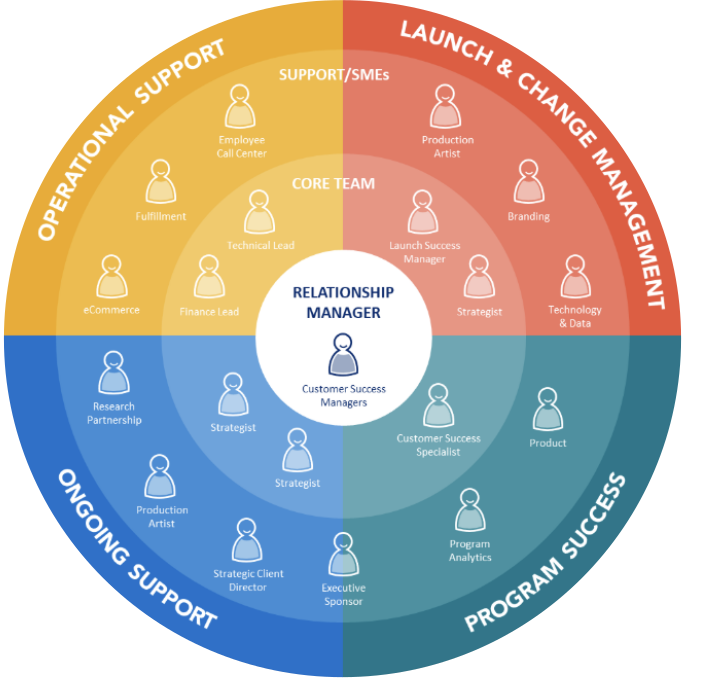

Managing a formula for success
Click the + for more info
Communicate early�program success and�update leaders.
And we care just as much about the human transition as the technical one.
Inspiring and enabling your workforce for early program adoption

9c224f